
cPanel / WHM Plugin
Maileroo Relay sends a cPanel/WHM server’s outgoing email through Maileroo, and sets each domain up automatically from a single Maileroo API key.
$10.00 Per Month
Overview
It installs as a WHM plugin plus a cPanel plugin, and routes Exim’s outbound mail over SSL/TLS while local delivery stays untouched.
Hosting providers, resellers and agencies running cPanel/WHM who want better inbox placement, a clean sending reputation, and no manual DNS work per domain.
Website forms, PHP mail(), WordPress and mail apps all relay automatically.
Domains that aren’t set up keep sending directly.
How It Works
1
Add
Adds the domain to your Maileroo account.
2
DNS
Writes the SPF, DKIM, DMARC and click-tracking records into the domain’s cPanel DNS zone.
3
Verify
Asks Maileroo to verify the DNS, and keeps re-checking until it passes.
4
Credentials
Creates an SMTP account and an API sending key for the domain.
5
Relay
Starts relaying that domain’s mail through Maileroo once it’s verified.
Features
SMTP relay (default): Exim smarthost to smtp.maileroo.com, messages passed on unchanged. Email API: an Exim pipe transport posts each message to Maileroo’s API over HTTPS, for servers with outbound SMTP blocked.
SSL/TLS on port 465 by default, certificate verified. STARTTLS on 587 or 2525 optional. Exim queues mail rather than ever sending it unencrypted. API and setup calls use HTTPS with TLS 1.2 or newer.
Paste one Maileroo account API key; pick domains; setup runs in the background with live progress. Scope: main domains, main + addon (default), or everything including parked domains and subdomains.
SPF merged into the existing record (never duplicated); DKIM added (split for long keys, with Maileroo’s CNAME fallback if needed); DMARC added only if missing; click-tracking CNAME. MX is never changed, so inbound mail is unaffected. Works with newer and older cPanel DNS APIs, and subdomain records go into the parent zone.
Asks Maileroo to scan DNS after every change and shows Maileroo’s own pass/fail per record. A domain only starts relaying once Maileroo verifies it. Re-checked every 10 minutes until it passes.
Switches on custom hostname tracking in Maileroo and publishes its CNAME (for example click.yourdomain.com). Needs a paid Maileroo plan; skipped with a clear note otherwise.
Creates an SMTP account (relay@domain) and an API sending key per domain. Manual entry and CSV bulk import also supported. Optional default credentials for other local senders.
Matches on the envelope sender, then the From: address, so PHP mail() and WordPress mail sent as user@hostname still relays under the right domain.
Re-sync rewrites wrong records and removes misnamed copies. maileroo diagnose domain shows Maileroo’s expected records beside the server’s zone and live DNS.
New cPanel accounts are set up immediately (WHM hook); new addon domains within 10 minutes (cron).
A page under cPanel › Email lets account owners see each domain’s status and DNS records, run one-click setup, paste credentials, test, or stop relaying, for their own domains only. Controlled per package in Feature Manager.
Route view (server → Maileroo → inboxes) with live status and encryption, domain list with per-record checks, settings, tests (SMTP sign-in with TLS details, API send, test through Exim, public SPF), activity log.
Installs switched off. Edits only its own marked blocks in Exim’s config, keeps 20 backups and rolls back automatically if cPanel rejects a change. Credential changes apply without an Exim restart. Clean uninstall.
maileroo tool for status, enable/disable, sync, verify, diagnose, tests and import.
Screenshots
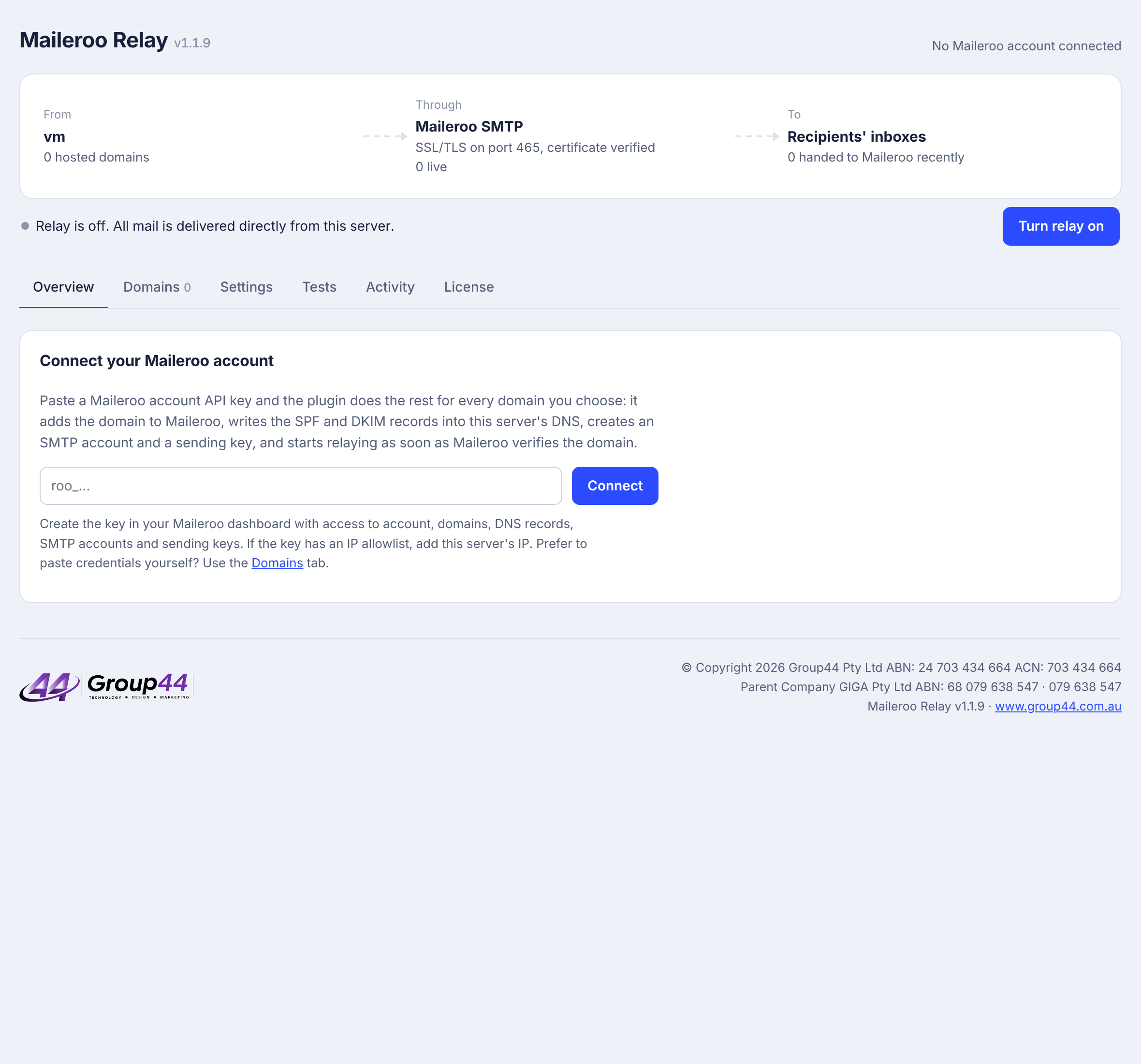
Paste the key and click Connect. Then tick the domains to set up, click Set up selected domains, and click Turn relay on.
Requirements
cPanel & WHM with Exim (standard cPanel setup), Jupiter theme, root SSH or WHM Terminal access.
A PHP CLI 7.4 or newer with json, curl (or openssl) and mbstring. EasyApache PHP works; the installer finds it.
An account API key (roo_…) with access to account, domains, DNS records, SMTP accounts and sending keys. Add the server’s IP if the key has an IP allowlist.
Outbound TCP 465 open (CSF: add it to TCP_OUT). API mode needs only 443.
Domains using this server’s DNS are set up fully automatically. Domains with DNS elsewhere get the exact records to add at their DNS provider.
Plan limits apply to how many domains you can add. Custom tracking domains need a paid plan.
Installation
Installation takes about five minutes as root. The relay installs switched off, so mail keeps flowing as before until you turn it on.
1
Upload and install: copy maileroo-cpanel.zip to /root/ (for example scp maileroo-cpanel.zip root@SERVER-IP:/root/, or WinSCP/FileZilla over SFTP), then run the commands shown. If unzip is missing: dnf install -y unzip. The installer installs the program to /usr/local/maileroo and the maileroo command, registers the WHM plugin (Plugins › Maileroo Relay) and the cPanel plugin (Email › Maileroo Relay), adds the 10-minute cron job and the new-account hook, and checks that smtp.maileroo.com:465 is reachable and warns if the firewall blocks it
2
Open port 465 (if the installer warned): add 465 to TCP_OUT in /etc/csf/csf.conf if missing, then run csf -r
3
Create a Maileroo account API key: in the Maileroo dashboard, create an API key (roo_…) with access to account, domains, DNS records, SMTP accounts and sending keys. If you restrict it by IP, add this server’s IP
4
Connect and set up domains: open WHM › Plugins › Maileroo Relay. Paste the key and click Connect. Tick the domains to set up and click Set up selected domains (progress shows live; you can leave the page). Then click Turn relay on. Each domain shows Live once Maileroo verifies it, usually within minutes. Domains with external DNS list the records to add at their DNS provider
5
Check it works: on the Tests tab, run SMTP sign-in; it should pass and show Encrypted: TLSv1.3. Run Test message through Exim to an outside address such as Gmail. On the Activity tab, the delivery line shows R=maileroo_smarthost, :465 and X=TLS1.3
					# Upload and install
wget https://plugins.mrnerds.com.au/maileroo-cpanel.zip
cd /root
unzip -o maileroo-cpanel.zip
cd maileroo-cpanel
bash install.sh

# If unzip is missing
dnf install -y unzip

# Open port 465 (if the installer warned)
grep ^TCP_OUT /etc/csf/csf.conf   # add 465 if missing
csf -r

# Check it works from the command line
maileroo status
maileroo diagnose yourdomain.com
exim -bt -f you@yourdomain.com someone@gmail.com   # shows router = maileroo_smarthost
Maintenance
Upload the new zip and run the installer again. Settings and credentials are kept, and the installer re-applies the Exim configuration and retries queued mail.
cd /root && unzip -o maileroo-cpanel.zip && cd maileroo-cpanel && bash install.sh
Uninstalling turns the relay off and removes the plugins, cron job and hook. Domains in Maileroo and DNS records in your zones are left in place.
					cd /root/maileroo-cpanel
bash uninstall.sh            # keeps /etc/maileroo credentials
bash uninstall.sh --purge    # also deletes credentials and settings
Troubleshooting
Outbound 465 blocked. Add 465 to CSF TCP_OUT and run csf -r.
Wrong SMTP credentials. Run Fix DNS and verify again on the domain to recreate them, or paste the right ones.
DNS hasn’t propagated, or the domain’s DNS is hosted elsewhere. Run maileroo diagnose domain and add any missing records at the DNS provider.
Run maileroo sync domain; the plugin rewrites and re-checks it. Send the diagnose output if it persists.
Upgrade the Maileroo plan, or turn off Set up a custom tracking domain in Settings.
Check WHM › Mail Queue Manager or exim -Mvl <id>; retry with Tests › Retry queued mail now.
Command Line
Version, mode, domains, Exim state, delivery and encryption counts.
Turn the relay on or off and rebuild Exim.
Save and check the account API key.
Set up or repair domains.
Re-check domains waiting for verification.
Maileroo’s expected records beside the server’s zone and live DNS.
SMTP sign-in test with TLS details.
Send a test message through Exim.
Import domain,smtp_username,smtp_password,api_key.
Re-apply the Exim configuration.
$10.00 per month. Questions about the plugin? Contact our team.