
cPanel / WHM Plugin
TurboSMTP Relay routes all outgoing email from a cPanel/WHM server through TURBOSMTP over an encrypted SSL connection. It also sets up SPF, DKIM and DMARC for every domain on the server automatically.
$10.00 Per Month
Overview
It is a WHM plugin with a matching cPanel page, built for hosting providers and server administrators.
It replaces direct delivery from the server’s own IP address, which is often blocked, rate-limited or sent to spam. Instead, mail goes through TURBOSMTP’s sending network.
Hosting providers and server administrators.
TURBOSMTP has no API for adding or verifying sender domains. That one step is done by hand in the TURBOSMTP dashboard, and the plugin gives you a ready-to-copy domain list for it.
Benefits
Mail leaves through TURBOSMTP instead of the server’s IP address.
Implicit SSL on port 465 or 25025, with certificate verification and no fallback to unencrypted.
Every domain on the server is discovered from the WHM API, and its DNS records are written into its zone.
A built-in SSL audit checks Exim’s live configuration and every delivery in the mail log.
Changes to Exim are rolled back automatically if Exim rejects them. Other customisations are never touched.
How It Works
The plugin adds one router and one transport to Exim. Mail from relayed senders goes to TURBOSMTP over SSL; everything else is delivered exactly as before.
1
Router
Sits first among the routers. Catches mail to remote addresses whose sender domain is in /etc/turbosmtp/senders, or every sender when the scope is all mail. Bounces are excluded.
2
Transport
Connects with implicit SSL (protocol = smtps) on port 465 or 25025, requires TLS and login, verifies TURBOSMTP’s certificate.
3
Sync
Reads all domains from the WHM API every 15 minutes and on account, addon, alias and subdomain changes (cPanel hooks). New domains are enabled automatically if you choose.
4
DNS
Writes SPF, DKIM and DMARC into each domain’s zone through the WHM DNS API, reads the zone back to confirm, and checks public DNS.
With the scope set to all outgoing mail, every sender takes the SSL path except bounces.
Mail to mailboxes on the same server is delivered locally and never leaves.
Features
The plugin covers the whole path from domain discovery to proving each message left over SSL.
Exim sends through pro.turbo-smtp.com (or pro.eu.turbo-smtp.com) on port 465 or 25025, implicit SSL only. TLS and authentication are required; the certificate is verified.
Relay only enabled domains, or all outgoing mail from the server (including the server hostname, cron and script mail).
Reads every main, addon, alias and subdomain from whmapi1 get_domain_info. Re-syncs every 15 minutes and immediately when accounts or domains are created or removed.
New domains can be switched on automatically, with or without subdomains.
Adds include:spf.turbo-smtp.com to the domain’s SPF record. Merges into an existing record, never creates a duplicate, and warns past 10 DNS lookups.
Publishes TURBOSMTP’s key at turbo-smtp._domainkey.<domain> and turbo-smtp._domainkey.email.<domain>. Checks the key is a valid RSA key, repairs keys mangled by copying, and removes duplicate records.
Adds a _dmarc policy (none, quarantine or reject) only where none exists. Subdomains inherit the parent policy.
Looks up TURBOSMTP’s shared DKIM key in public DNS so you may not need to paste it.
Checks SPF, DKIM and DMARC through public resolvers (1.1.1.1 and 8.8.8.8), so you see what TURBOSMTP sees.
Flags domains whose public DNS is answered by another provider (Cloudflare, a registrar) and gives the exact records to add there.
Proves from Exim’s live config and the mail log that outgoing mail went to TURBOSMTP over SSL. Flags direct sends and other relay plugins.
SSL connection and login test (no mail sent), test email through Exim, test email through the TURBOSMTP HTTP API.
Recent relayed deliveries from the Exim log, TURBOSMTP analytics by date range, and the plugin’s own log.
Dashboard, Domains, Settings, Test & diagnostics and Activity tabs. Bulk actions, search and filters.
Customers see their domains’ relay and DNS status, can fix DNS in their own zone, and can send a test email.
turbosmtp tool for status, sync, relay on/off, DNS repair, live checks, SSL audit and settings.
Exim changes are validated and rolled back on failure, with 10 timestamped backups. Credentials are kept out of the world-readable Exim config.
Screenshots
Screenshots are from a demo server with sample domains.
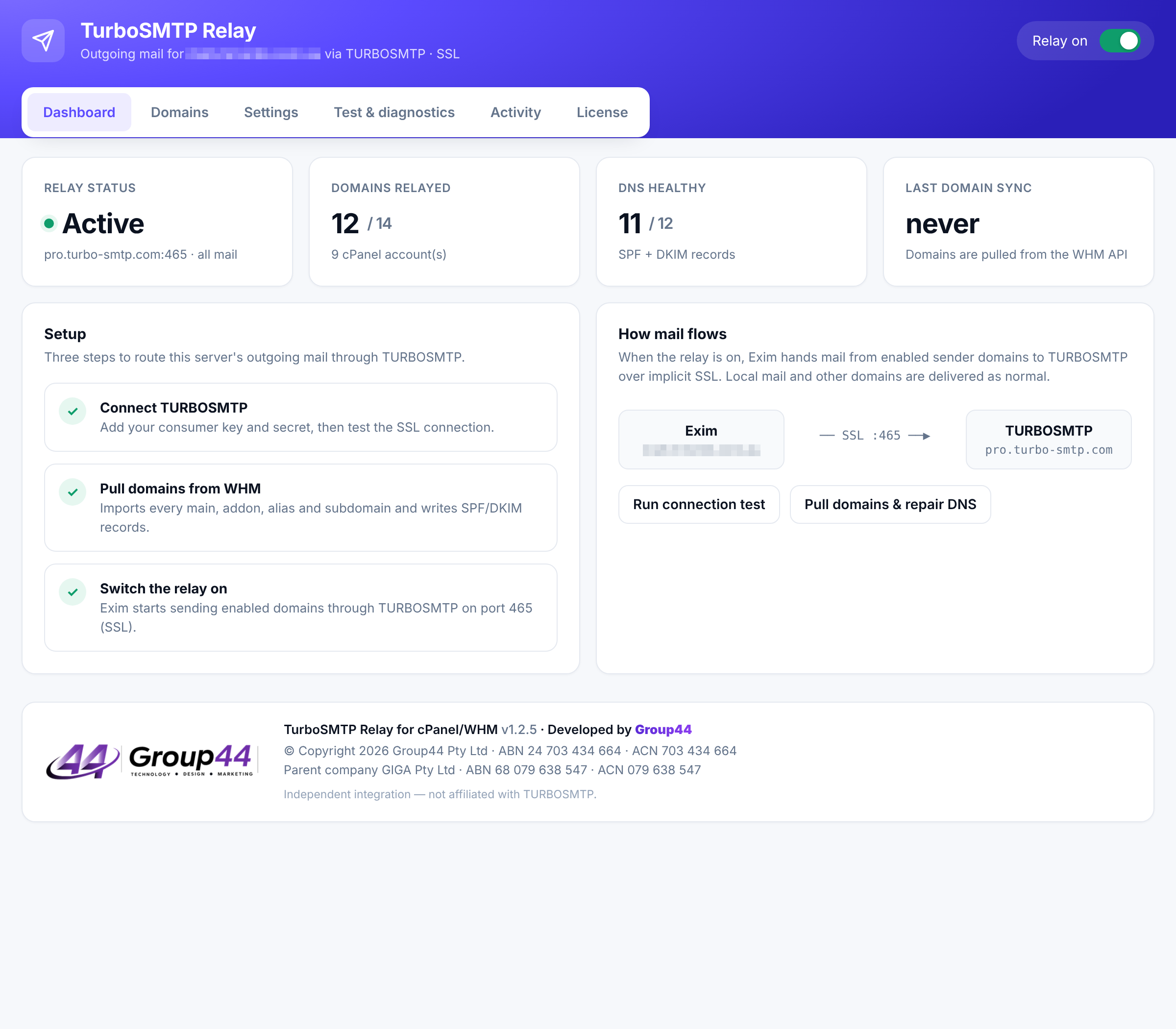
Relay status, domains relayed, DNS health and last sync at a glance. The relay switch sits top right.
Requirements
You need root access to a cPanel/WHM server and a TURBOSMTP account with an API key.
cPanel & WHM 102 or later, Jupiter theme.
AlmaLinux, Rocky Linux, CloudLinux or Ubuntu (any OS cPanel supports).
Root SSH access to the server.
cPanel’s built-in PHP 7.4+ (/usr/local/cpanel/3rdparty/bin/php) with curl, json and openssl. The posix extension is optional.
Exim (cPanel’s default). Outbound port 465 or 25025 open to TURBOSMTP.
An active account with an API key: consumer key and consumer secret, from Settings › Integrations › API Keys. Since April 2025 account passwords no longer work for SMTP.
TURBOSMTP’s DKIM value, from Settings › Sender Domain Verification (use the Copy button), or auto-detected.
Domains whose DNS is hosted on the server are handled automatically. Domains on external DNS need the records added at that provider.
No other relay plugin (for example a Maileroo relay) active in Exim at the same time.
dig (package bind-utils or dnsutils) for live checks through public resolvers. Without it, the plugin uses the server’s own resolver.
Installation
Installation takes about 2 minutes and finishes with a self-test of the WHM page. Nothing is sent through TURBOSMTP until you add credentials and switch the relay on.
1
Upload the package turbosmtp-cpanel-1.2.4.zip to /root/ on the server. Use SCP, SFTP (for example FileZilla) or WHM’s File Manager. With SCP from your computer: scp turbosmtp-cpanel-1.2.4.zip root@your-server-ip:/root/
2
Check it arrived: log in over SSH as root and run ls -l /root/turbosmtp-cpanel-1.2.4.zip
3
Unpack and run the installer: run the commands shown below
4
Read the installer output: each step prints a tick. It checks for root, cPanel and cPanel’s PHP with its extensions; installs the core to /usr/local/turbosmtp and the turbosmtp command; creates /etc/turbosmtp with the right permissions for Exim; registers the WHM plugin and installs the cPanel (Jupiter) page; registers hooks for account, addon, alias and subdomain changes, plus a 15-minute cron job; imports your domains (no DNS changes until credentials are saved); on an upgrade, re-checks DNS for every enabled domain; and self-tests the WHM page
5
Confirm the last line reads WHM page renders correctly and the version is right: grep "VERSION =" /usr/local/turbosmtp/lib/bootstrap.php
6
Open the plugin at WHM › Plugins › TurboSMTP Relay. Refresh WHM if it does not appear yet
					# Upload the package (from your computer)
scp turbosmtp-cpanel-1.2.4.zip root@your-server-ip:/root/

# Check it arrived
ls -l /root/turbosmtp-cpanel-1.2.4.zip

# Unpack and run the installer
cd /root
rm -rf turbosmtp-cpanel
unzip -o turbosmtp-cpanel-1.2.4.zip
cd turbosmtp-cpanel
bash install.sh

# Confirm the version
grep "VERSION =" /usr/local/turbosmtp/lib/bootstrap.php
Configuration
Create an API key, connect, add the DKIM key, publish DNS, verify domains at TURBOSMTP, choose the scope, remove other relays, switch on.
1
Create an API key in TURBOSMTP: go to Settings › Integrations › API Keys and create a key. Note the consumer key and consumer secret
2
Connect the plugin: in WHM, open TurboSMTP Relay › Settings. Paste the consumer key and secret, choose the region (Global pro.turbo-smtp.com or EU pro.eu.turbo-smtp.com), choose the SSL port (465 recommended or 25025) and leave Strict certificate verification on. Click Test these credentials. You should see “Connected and authenticated over SSL”. Then click Save settings
3
Add the DKIM key: under Settings › DNS, click Auto-detect key. If it is not found, in TURBOSMTP open Settings › Sender Domain Verification and add any one of your domains, click the Copy button next to “DKIM value” (do not copy from the red error box: it shows each + in the key as a space), paste it into the plugin and save. The key is the same for every domain, and saving publishes it to all enabled domains
4
Publish DNS: on the Domains tab, click Pull & repair all DNS. Each domain gets its SPF include, both DKIM records and (if enabled) DMARC. Click Verify to check what the public sees. A domain marked External NS needs its records added at that provider: click Records for copy-ready values
5
Verify the domains at TURBOSMTP: on the Domains tab, click Copy domain list. In TURBOSMTP, go to Sender Domain Verification, then Add Domain and Verify for each one. Domains with DNS on this server should pass straight away. Allow up to the record’s TTL (usually 4 hours) if TURBOSMTP still sees an old cached value
6
Choose the relay scope under Settings › Relay scope: Only enabled domains (mail from domains switched on in the Domains tab), or All outgoing mail from this server (everything, including the server hostname, cron jobs, scripts and PHP mail without a proper sender). Choose this to send all email over SSL
7
Remove any other relay plugin: only one relay may be active in Exim. If another one is installed (for example a Maileroo relay), uninstall it or switch its relay off. The SSL audit flags any that remain
8
Switch the relay on with the toggle at the top right and click Continue. Exim is rebuilt and restarted, which takes 10 to 60 seconds
Verify
The SSL audit gives a PASS only when every outgoing message since the relay was switched on went to TURBOSMTP over SSL. Run it after sending a test email.
1
Send
In Test & diagnostics, enter a From address on one of your domains and a To address, then click Send via Exim relay.
2
Audit
Click Run SSL audit, or over SSH run turbosmtp ssl-audit.
3
Read
The audit checks Exim’s live configuration (as loaded, via exim -bP) and sorts every delivery in the recent log. Only mail sent after the relay was switched on is counted; older log lines are ignored.
No other relay plugin active; relay switched on and transport loaded in Exim; implicit SSL (protocol = smtps), port 465 or 25025; TLS required (hosts_require_tls = *); certificate verified (tls_verify_hosts = *); authentication required (hosts_require_auth = *); scope all outgoing mail, to send everything over SSL.
Via TURBOSMTP over SSL: all outgoing mail, with TLS version and certificate verified. Via TURBOSMTP without SSL: 0 (the configuration does not allow it). Not via TURBOSMTP: 0; any listed with sender, recipient and reason. Bounces (sender <>) are shown separately and are never relayed by design. Local mailbox deliveries are not outgoing and not counted.
Each line should contain H=pro.turbo-smtp.com …:465 (or :25025), X=TLS1.3:… or TLS1.2, CV=yes (certificate verified) and A=turbosmtp_login.
grep "T=turbosmtp_smtp" /var/log/exim_mainlog | tail -3
Using the Plugin
Administrators work in WHM, customers see their own domains in cPanel, and everything can also be done from the command line.
Relay status, domains relayed, DNS health, last sync, setup checklist and mail-flow summary. The relay on/off toggle sits top right.
Every domain with its account, type, relay switch, SPF/DKIM/DMARC status and live DNS. Search, filter (enabled, disabled, needs attention, type) and bulk-enable, disable, repair or verify. Per row: Repair DNS, Verify, Records. Below: Copy domain list for TURBOSMTP.
Credentials, region and port, certificate verification, relay scope, auto-sync and auto-enable, subdomains, test sender, SPF/DKIM/DMARC options, DKIM auto-detect, optional analytics login.
SSL audit, SSL connection test, test email through Exim or the API, recent relayed deliveries, plugin log.
TURBOSMTP analytics for a date range.
Each customer sees only their own domains: whether relay is enabled, live SPF/DKIM/DMARC status, and the exact records. Fix DNS writes missing or broken records into their own zone. Send test sends a test message from one of their domains.
Maintenance
Updates install over the top and keep all settings and domain state; uninstalling takes Exim off the relay first.
Upload the new zip to /root/, then run the command. The installer re-checks DNS for all enabled domains and self-tests the WHM page. Delete old zips first so the right one is unpacked.
cd /root && rm -rf turbosmtp-cpanel && unzip -o turbosmtp-cpanel-<version>.zip && cd turbosmtp-cpanel && bash install.sh
It removes the Exim block first (mail goes back to direct delivery), then the hooks, cron job, WHM and cPanel plugins and files. DNS records are left in place on purpose; remove them in Zone Editor if you no longer need them.
					bash /root/turbosmtp-cpanel/uninstall.sh          # keeps settings in /etc/turbosmtp
bash /root/turbosmtp-cpanel/uninstall.sh --purge  # also deletes settings and the log
Security
The WHM page is limited to root.
Credentials are never written into exim.conf, which is world-readable. Exim reads them from the root:mail files only when it delivers. The credentials are sent only to the TURBOSMTP transport.
Secrets are never sent back to the browser: the settings form shows them masked.
Every command runs without a shell, and all domain names are validated.
Troubleshooting
Most problems show up in the Domains tab notes, the SSL audit or /var/log/turbosmtp.log; start there.
Cause: an old version is installed, or a PHP error. Fix: check the version (grep "VERSION =" /usr/local/turbosmtp/lib/bootstrap.php), reinstall the latest zip, and read /var/log/turbosmtp.log and /usr/local/cpanel/logs/error_log.
Cause: app not registered. Fix: /usr/local/cpanel/bin/register_appconfig /root/turbosmtp-cpanel/src/appconfig/turbosmtp.conf
Cause: DKIM value not set. Fix: Settings › DNS › Auto-detect key, or paste from TURBOSMTP’s Copy button.
Cause: key copied from TURBOSMTP’s red error box, which shows + as spaces. Fix: use the Copy button next to “DKIM value”.
Cause: duplicate or broken record, or an old cached value. Fix: Repair DNS, then check that dig +short TXT turbo-smtp._domainkey.<domain> @1.1.1.1 shows one line with the + signs. Purge caches at one.one.one.one/purge-cache and dns.google/cache, or wait out the TTL.
Cause: public DNS is answered by another provider. Fix: click Records and add the values at that provider.
Cause: more than one DKIM TXT at the same name. Fix: Repair DNS keeps one correct record and removes the rest.
Cause: TURBOSMTP has no API for adding domains. Fix: add it by hand: Sender Domain Verification › Add Domain › Verify.
Cause: Exim rebuild and restart in progress. Fix: wait up to 60 seconds; on failure the switch reverts and shows the error.
Cause: relay scope is “Only enabled domains”. Fix: turbosmtp set relay_mode all, or Settings › Relay scope.
Cause: another relay router (e.g. maileroo_smarthost) in Exim. Fix: uninstall that plugin; check with grep -n maileroo /etc/exim.conf.local
Cause: credentials, firewall or port. Fix: check the consumer key and secret; allow outbound 465 or 25025; try the other port.
Cause: Exim rejected the new config. Fix: it was rolled back automatically; the error is shown and logged.
Command Line
Summary: relay state, host, port, domain counts, last sync.
Pull domains from WHM; –full also re-checks DNS for every enabled domain.
Switch the Exim relay on or off.
Enable or disable relaying for domains.
Create or fix DNS records.
Live public DNS check.
Look up TURBOSMTP’s DKIM key in DNS and save it.
SSL connection and login test, no mail sent.
Prove outgoing mail went to TURBOSMTP over SSL.
Change a setting, e.g. relay_mode all, port 25025; rebuilds Exim when needed.
$10.00 per month. Questions about the plugin? Contact our team. TURBOSMTP, cPanel and WHM are trademarks of their owners. This plugin is an independent integration, not affiliated with or endorsed by TURBOSMTP.