
cPanel / WHM Plugin
Group44 Mailgun SMTP Relay sends every outgoing email from a cPanel & WHM server through Mailgun over encrypted SSL/TLS. It also sets up each hosted domain in Mailgun automatically, DNS included.
$10.00 Per Month
Overview
It is built for hosting providers who want better inbox placement and full delivery visibility without configuring Exim, Mailgun and DNS by hand for each domain.
Group44 Mailgun SMTP Relay for cPanel & WHM
1.1.0
Group44 Pty Ltd · www.group44.com.au
Mailgun (mailgun.com), US or EU region.
WHM plugin (root), cPanel page (customers), command line.
group44-mailgun-cpanel-1.1.0.zip
Benefits
Server → Mailgun uses SMTPS on port 465 only, with a verified certificate. Mailgun → recipient requires TLS too.
Pulls every domain from WHM, creates it in Mailgun with its own login, writes SPF/DKIM/tracking DNS and verifies it.
Only verified domains are routed. If Mailgun is down, mail queues instead of being sent unencrypted.
30-day delivery chart, per-domain events, diagnostics and an activity log in WHM; a self-service page for customers in cPanel.
How It Works
The plugin adds a router to the server’s Exim mail system. Every outgoing message goes to Mailgun over SSL, signed in with the sending domain’s own Mailgun login.
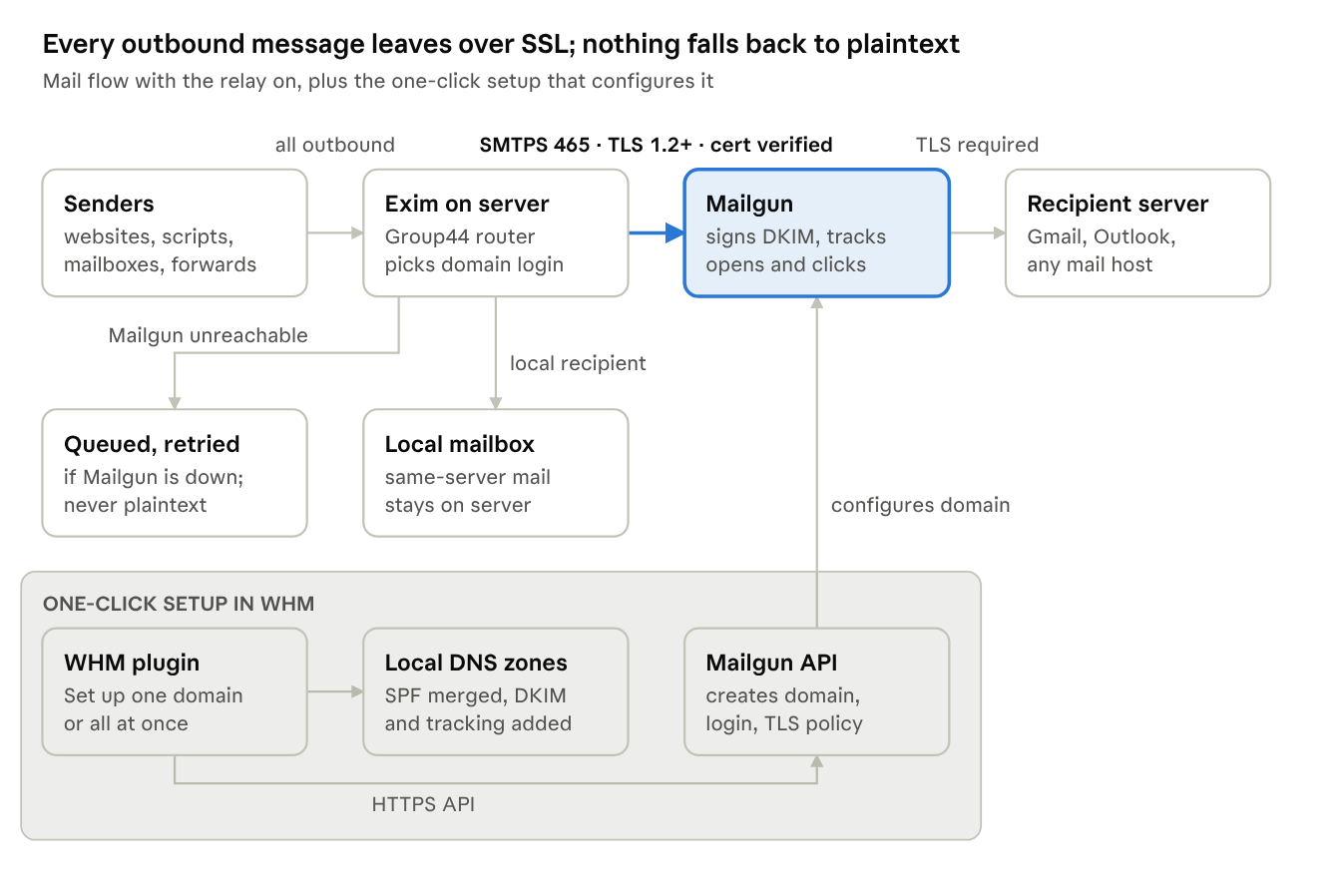
Senders that aren’t set up, forwards and bounces use the catch-all domain’s login.
Mail between mailboxes on the same server never leaves it.
Mail waits in the queue and retries, so it is never sent without encryption.
Nothing bounces while DNS propagates.
Features
The plugin covers setup, sending, monitoring and testing across three interfaces: a WHM plugin for the server owner, a cPanel page for customers, and a command line for automation.
Screenshots
Screenshots are from a demo server with sample domains.
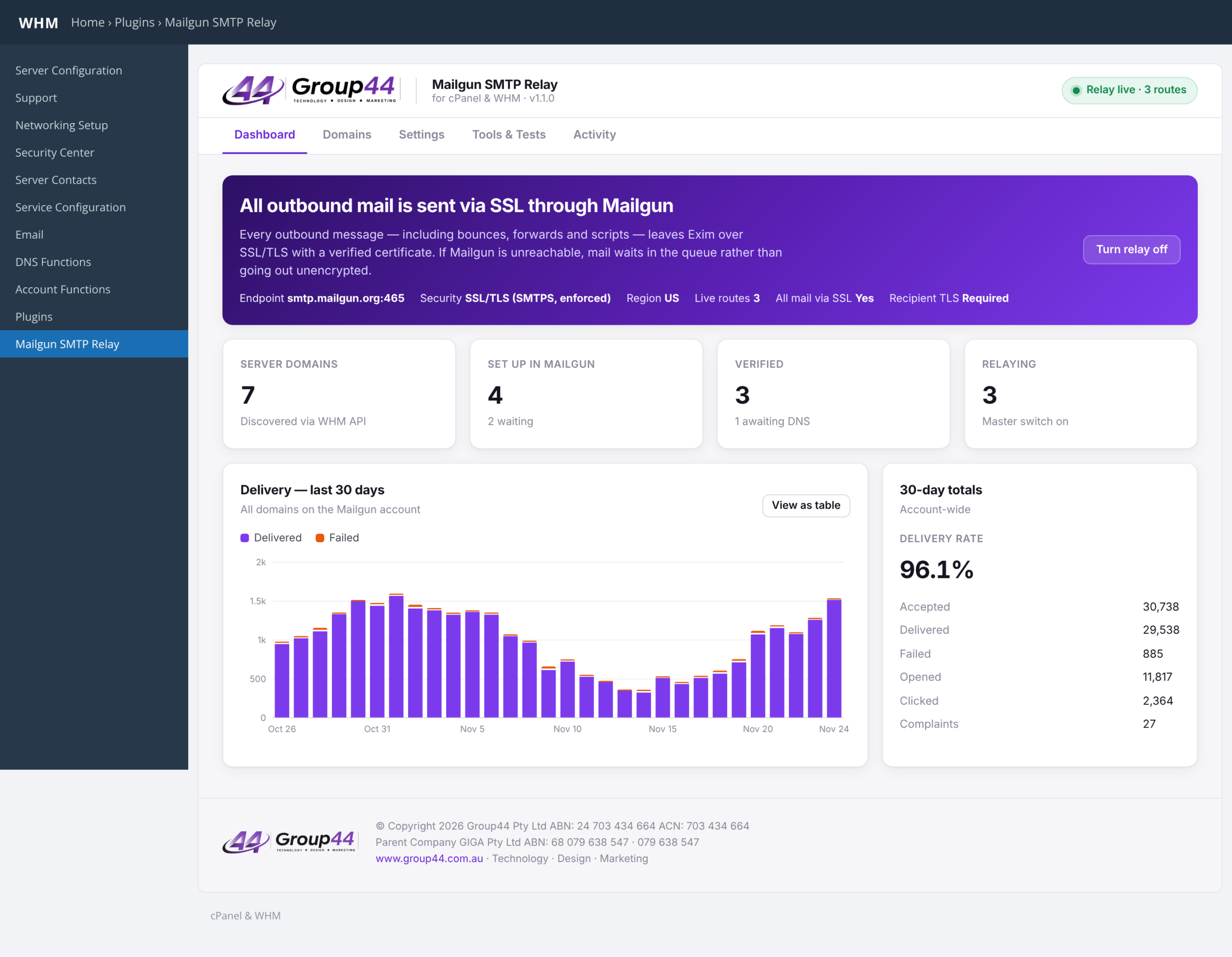
Status banner, domain counters, the 30-day delivered vs failed chart and 30-day account totals.
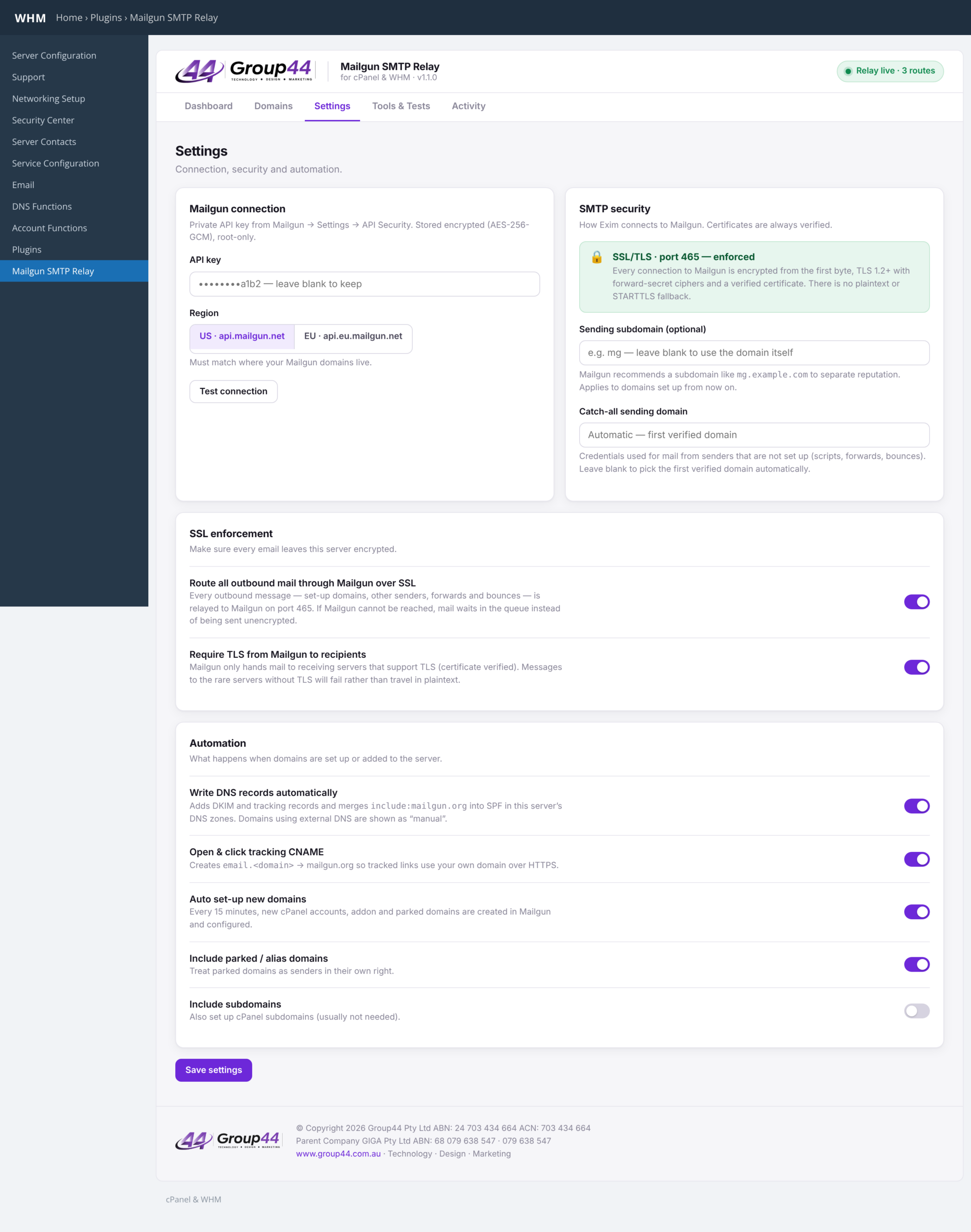
Mailgun API key and region, SMTP security, SSL enforcement and automation switches.
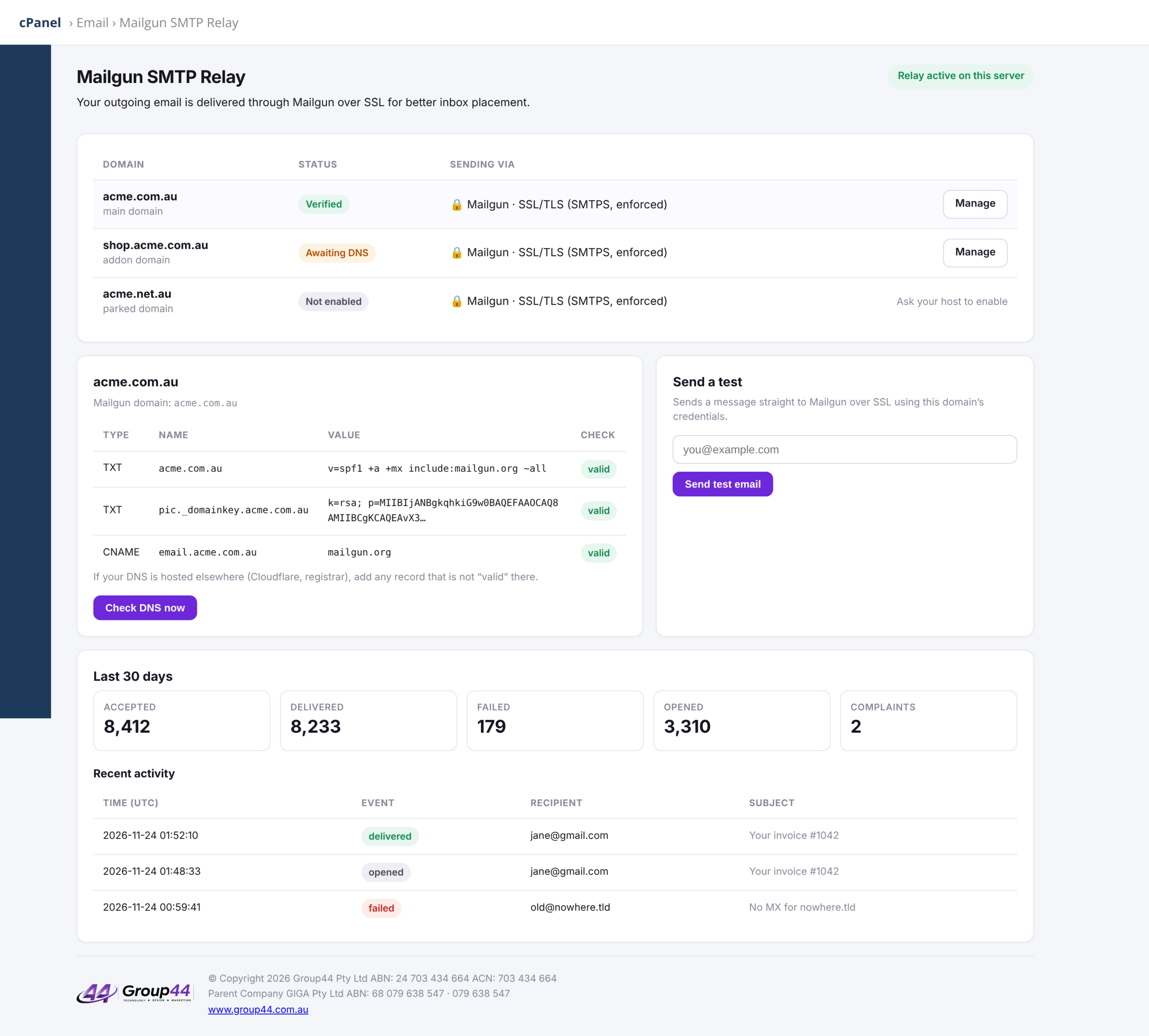
Each customer sees their own domains, DNS records with Mailgun’s valid / invalid check, a test email form, 30-day totals and recent activity.
Requirements
cPanel & WHM 110 or newer.
Root SSH access.
AlmaLinux, Rocky Linux, CloudLinux or Ubuntu (any OS cPanel supports).
Exim 4.92+ (ships with cPanel) for SMTPS on port 465.
cPanel’s built-in PHP with the curl and openssl extensions (checked by the installer).
Jupiter, for the customer page (the WHM plugin works without it).
An account plus a private API key (Mailgun → Settings → API Security).
Outbound TCP 465 open; with CSF, check SMTP_BLOCK and TCP_OUT.
unzip on the server (yum install unzip or apt install unzip).
Mailgun trial and free plans can only send to authorised recipients until the account is upgraded.
Installation
Installing takes about five minutes: upload the zip, run one script as root, then finish setup in WHM.
1
Upload the package to the server: scp group44-mailgun-cpanel-1.1.0.zip root@your-server:/root/
2
Unzip it and run the installer: log in over SSH as root and run the commands shown below
3
Read the installer output: the installer checks for cPanel and PHP, copies the files, registers the WHM plugin, installs the cPanel page, adds the 15-minute cron job and restarts cpsrvd. It ends with “✔ Group44 Mailgun SMTP Relay installed”
					# Upload the package to the server
scp group44-mailgun-cpanel-1.1.0.zip root@your-server:/root/

# Unzip it and run the installer
ssh root@your-server
cd /root
unzip group44-mailgun-cpanel-1.1.0.zip
cd group44-mailgun
bash install.sh
Configuration
The Dashboard shows All mail via SSL: Yes once at least one domain is verified and the relay is on.
1
Open the plugin: in WHM, go to Plugins → Mailgun SMTP Relay
2
Settings: paste the Mailgun private API key and choose the US or EU region. Click Test connection, then Save settings. SSL on port 465 is enforced automatically
3
Domains: click Set up all domains, or Set up on individual domains. Each one shows Verified, or Awaiting DNS while DNS propagates
4
Dashboard: click Turn relay on and confirm. This adds the relay to Exim and restarts it
5
Tools & Tests: click Apply TLS policy to all domains, then send a Direct SSL/SMTP test and a Send via Exim test to your own address
6
Optional, for customers: in WHM → Feature Manager, tick Mailgun SMTP Relay in the feature lists that should get the cPanel page
Maintenance
Settings, domains, credentials and the API key are kept across updates. Then in Tools & Tests, click Install / repair Exim config.
					cd /root && rm -rf group44-mailgun
unzip group44-mailgun-cpanel-<version>.zip
cd group44-mailgun && bash install.sh
The Exim relay is removed first, so mail goes back to direct delivery immediately. Domains in your Mailgun account are not deleted.
					cd /root/group44-mailgun
bash uninstall.sh          # keeps settings
bash uninstall.sh --purge  # also deletes settings and stored credentials
Settings Reference
The defaults give full SSL coverage. Most servers only need the API key and region.
Default: (empty). Mailgun private key. Encrypted on save; leave blank to keep the current one.
Default: US. US uses api.mailgun.net / smtp.mailgun.org; EU uses the .eu hosts. Must match your Mailgun account.
Default: SSL/TLS, port 465. Fixed. No plaintext or STARTTLS option.
Default: (empty). E.g. mg creates mg.example.com in Mailgun; mail still sends as @example.com. Applies to new setups.
Default: Automatic. Domain whose login carries mail from senders not set up (scripts, forwards, bounces). Automatic picks the first verified domain.
Default: On. Every outbound message goes via Mailgun on 465. Off = only set-up domains are relayed.
Default: On. Mailgun only delivers to receiving servers that support TLS. Off = Mailgun may fall back to plaintext.
Default: On. Adds DKIM and tracking records and merges SPF in local DNS zones.
Default: On. Adds email.<domain> → mailgun.org for tracked links.
Default: Off. Cron sets up new accounts, addon and parked domains every 15 minutes.
Default: On. Parked domains are treated as senders in their own right.
Default: Off. Also sets up cPanel subdomains.
Command Line
Run as root with /usr/local/cpanel/3rdparty/bin/php /opt/group44/mailgun/cli.php <command>.
Set up every eligible domain not yet set up (–all re-applies every domain).
Set up one domain.
Re-check one domain’s DNS with Mailgun.
Re-check all domains awaiting DNS.
What the scheduled job runs.
Regenerate relay routes and the Exim config.
Remove the relay from Exim.
Show Exim status, settings and domain count.
Security
Mail is encrypted on both legs, and secrets are encrypted at rest and readable only by root.
SMTPS on port 465 only, TLS 1.2+ with forward-secret ciphers, certificate and hostname verified, SNI sent. A failed check queues mail; it is never sent without encryption.
Require-TLS is set on every domain, with certificate verification on.
HTTPS only, with peer and hostname verification.
Each domain has its own Mailgun SMTP login with a random 28-character password, so one domain’s login can’t send for another.
The API key and SMTP passwords are stored with AES-256-GCM, keyed by a root-only secret.
Root only, with a security token tied to the WHM session on every action.
Customers reach only their own domains through a privileged helper that checks ownership on every request.
The relay is merged into /etc/exim.conf.local between marked lines, so WHM Advanced Editor changes are kept. A backup is taken first, and the old config is restored automatically if the rebuild fails.
Server commands run with argument lists, never through a shell.
Files & Locations
Command-line usage is listed under Commands above.
					# Application code, assets and cli.php
/opt/group44/mailgun/

# WHM interface
/usr/local/cpanel/whostmgr/docroot/cgi/group44_mailgun/index.cgi

# API module behind the cPanel page
/usr/local/cpanel/Cpanel/API/Group44Mailgun.pm

# Privileged helper for the cPanel page
/usr/local/cpanel/bin/admin/Group44/Mailgun

# cPanel page
/usr/local/cpanel/base/frontend/jupiter/group44_mailgun/

# Settings, domain state, activity log, Exim backups (root only)
/var/cpanel/group44_mailgun/

# Per-domain relay logins read by Exim (root and the mail group only)
/etc/group44_mailgun/exim_routes

# Exim relay blocks, between GROUP44_MAILGUN markers
/etc/exim.conf.local

# 15-minute sync and verify job
/etc/cron.d/group44_mailgun
Troubleshooting
Cause: outbound port 465 blocked. Fix: in CSF, check SMTP_BLOCK and add 465 to TCP_OUT; ask your provider if they block it.
Cause: wrong key, or US/EU region mismatch. Fix: re-paste the private key; switch region in Settings.
Cause: records not visible to Mailgun yet, or DNS hosted elsewhere. Fix: wait for propagation; for “manual” records, add them at the external DNS provider (Details shows the exact values).
Cause: relay off, or no verified domain for the catch-all route. Fix: turn the relay on and verify at least one domain.
Cause: relay off, or the domain not verified. Fix: turn the relay on; verify the domain.
Cause: that receiving server doesn’t support TLS, and require-TLS is on. Fix: expected under strict SSL; turn off Require TLS from Mailgun to recipients if that mail must go through.
Cause: a conflicting custom Exim setting. Fix: the old config is already restored; check Activity for the error, fix the custom setting, then Install / repair Exim config.
Cause: feature not enabled. Fix: tick Mailgun SMTP Relay in WHM → Feature Manager.
Cause: relay defers rather than sending without SSL. Fix: no action needed; Exim retries automatically.
FAQ
No. Only outbound sending is relayed.
It is delivered locally and never leaves the machine.
Yes, with route-all on. They use the catch-all domain’s login.
No. Only Remove in a domain’s Details, with the delete box ticked, deletes it from Mailgun.
All rights reserved. The software is licensed, not sold, for use on servers you own or administer under a valid licence from Group44 Pty Ltd. It may not be redistributed, resold, sublicensed, or have its copyright notices removed without written permission.
$10.00 per month. Questions about the plugin? Contact our team. Mailgun is a trademark of its owner. cPanel and WHM are trademarks of cPanel, L.L.C. This product is not affiliated with or endorsed by them.