
WHMCS Module
The Revolut Merchant API Gateway lets WHMCS customers pay invoices through a Revolut Business merchant account. They can pay by card, saved card, Revolut Pay, Apple Pay or Google Pay, and the invoice is marked Paid automatically.
$9.95 Per Month
Overview
It is a standard WHMCS third-party payment gateway module, written in plain PHP with no external libraries.
Revolut (revolut)
1.2.0
Group44 Pty Ltd – www.group44.com.au
WHMCS payment gateway (third-party / invoice link)
Merchant API, Revolut-Api-Version 2024-09-01 by default (configurable)
Production (merchant.revolut.com) and Sandbox (sandbox-merchant.revolut.com)
whmcs-revolut-gateway-v1.2.0.zip
Hosting companies and other WHMCS businesses with a Revolut Business merchant account. They want customers to pay inside the WHMCS invoice page, with optional saved cards and automatic billing.
Features
Payment Journey
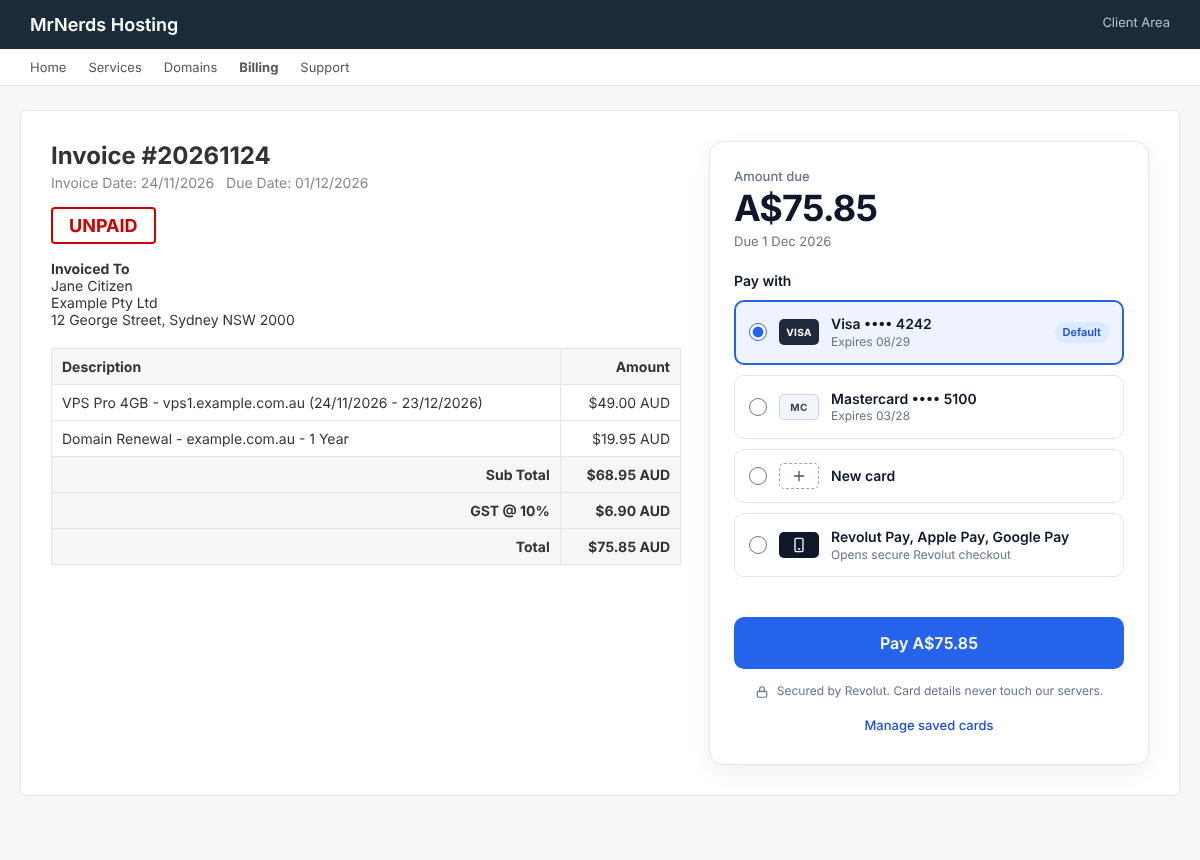
The customer pays from one panel on the invoice. Whichever way they pay, WHMCS only marks the invoice Paid after reading the order back from Revolut.
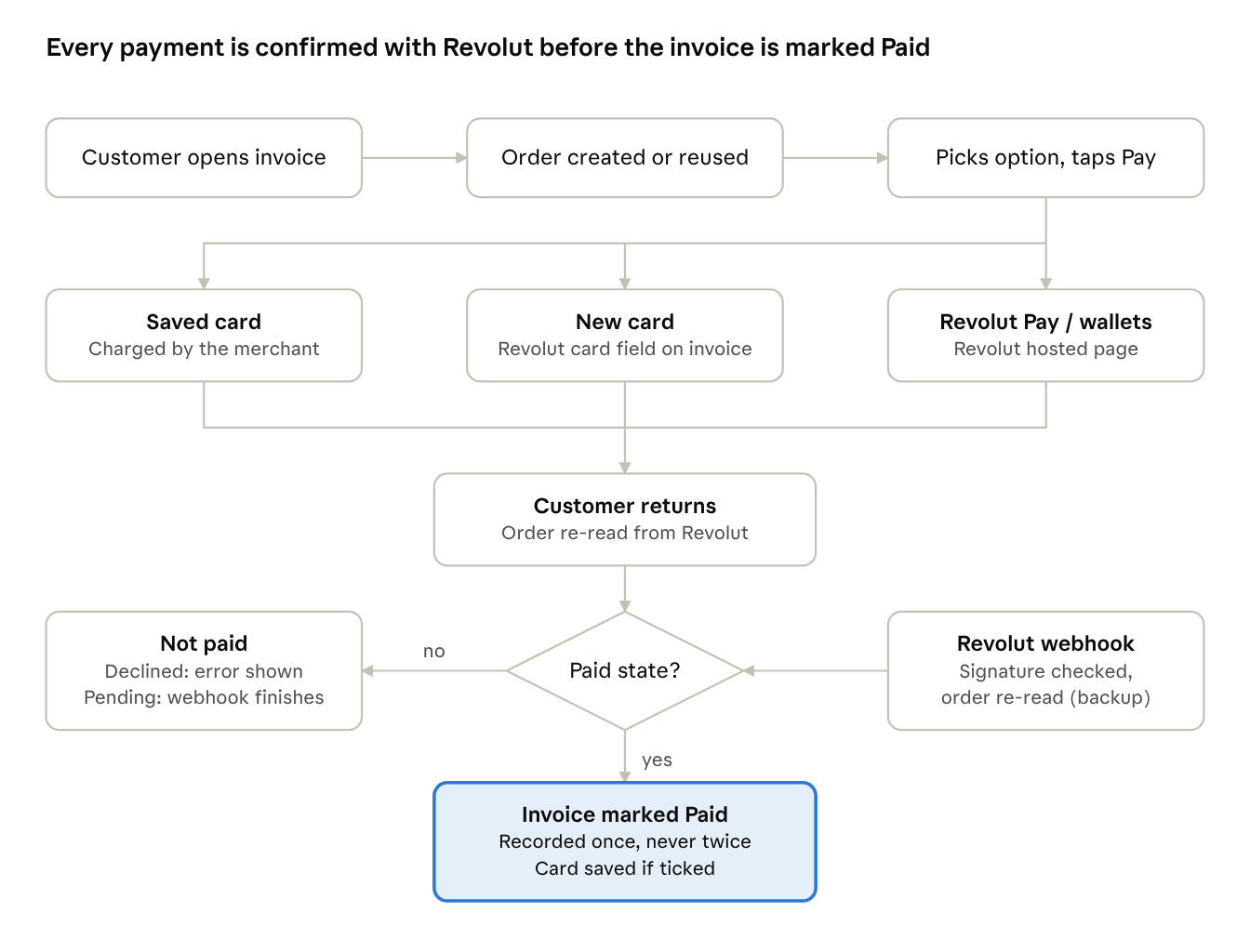
The return page settles most payments straight away. The webhook catches payments where the customer closed the browser or the payment was still processing.
One Revolut order is created per invoice and reused for 6 hours while the amount and currency stay the same. The order carries the invoice number as its reference, the WHMCS invoice and client IDs in its metadata, the customer, and the return URL. Capture is automatic.
Customers land back on the invoice with WHMCS’s standard banners: payment successful, payment failed, or pending review (still processing).
3 ways to pay, 2 confirmation paths.
Payment Panel
POSTs to the callback; creates an order for the balance and charges the card; returns Paid, Processing or Failed.
Submits the card in Revolut’s iframe (3-D Secure handled by Revolut); on success goes to the return page.
Opens the order’s Revolut checkout link; Revolut redirects back to the return page.
Screenshots
These show v1.2.0, rendered from the module’s own output with sample data. The invoice details on the left are stand-ins: on a live site your WHMCS theme appears there.
The default view: the default saved card is pre-selected.
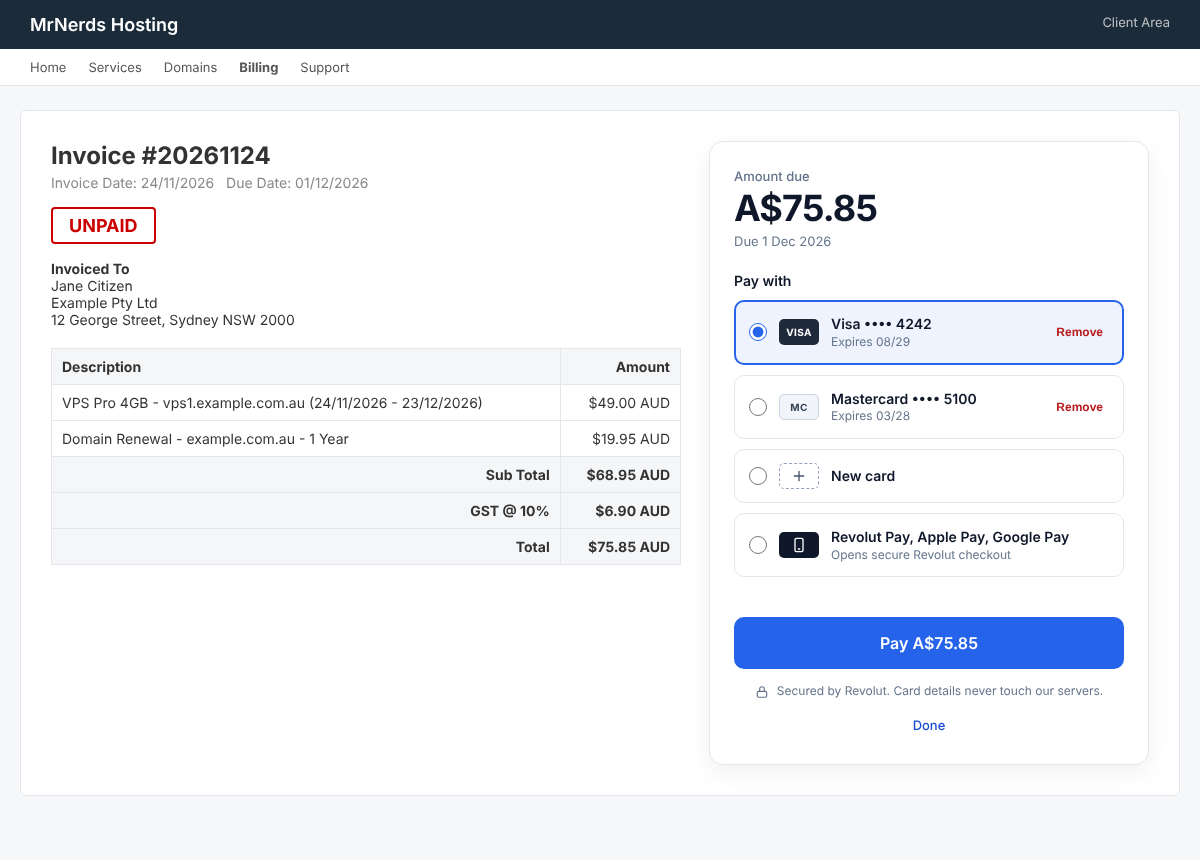
Remove mode: a Remove link on each saved card.
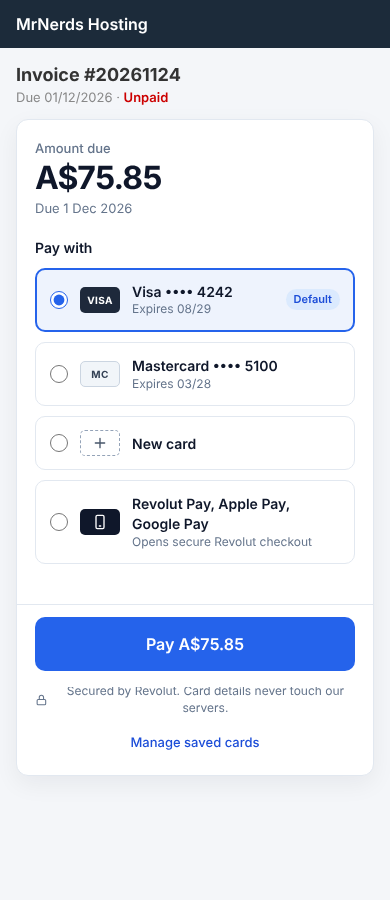
The Pay button is pinned to the bottom.
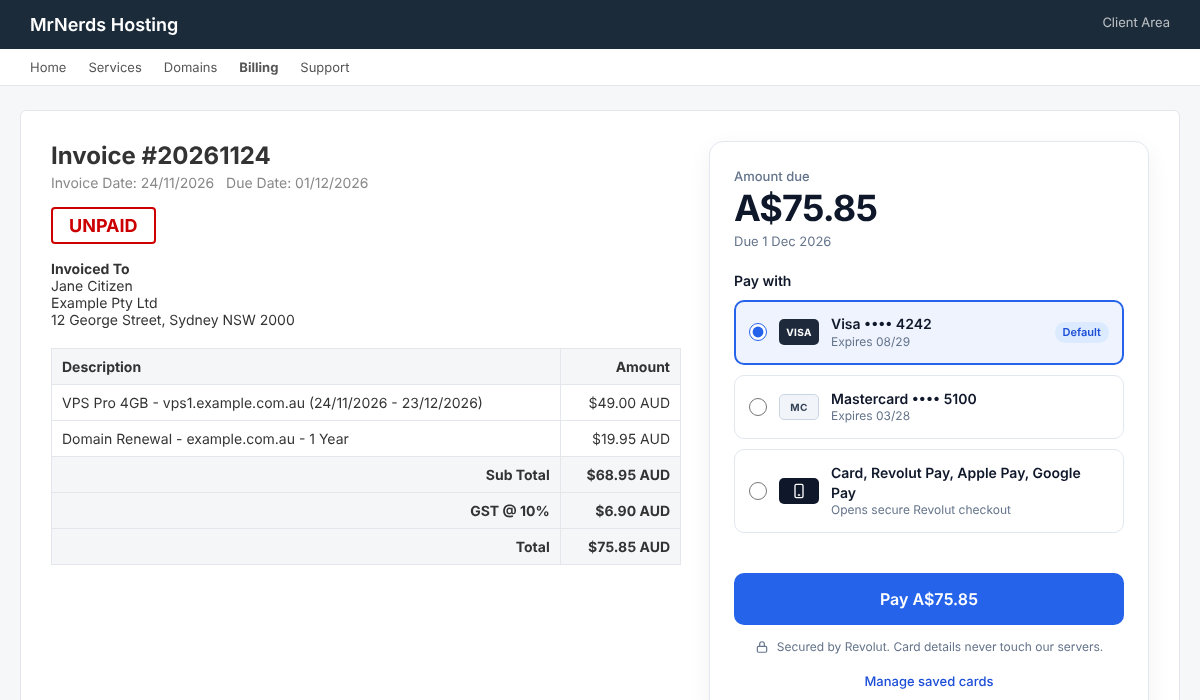
The Revolut Hosted Checkout option.
Requirements
The module needs WHMCS 9.1.0 or later and PHP 8.3 or 8.4. It checks this itself: on an older WHMCS or PHP it shows a red warning in the gateway settings, and customers see a notice instead of the payment panel.
9.1.0 and above
8.3 and 8.4
8.0 (MariaDB 10.6+ also works)
15.0.0 – needed by WHMCS itself; the module is plain PHP and is not encoded
cURL, JSON, hash, OpenSSL (random_bytes)
HTTPS System URL (Revolut only sends webhooks to HTTPS)
A verified Revolut Business account with a Merchant account and API access
Revolut offers merchant accounts to businesses registered in Australia, Austria, Belgium, Bulgaria, Croatia, Cyprus, Czech Republic, Denmark, Estonia, Finland, France, Germany, Greece, Hungary, Iceland, Ireland, Italy, Latvia, Lithuania, Luxembourg, Malta, Netherlands, Norway, Poland, Portugal, Romania, Slovakia, Slovenia, Singapore, Spain, Sweden and the United Kingdom. US, Swiss and Liechtenstein businesses can open Revolut Business but not a merchant account. Customers can pay from any country.
Card, Apple Pay and Google Pay payments accept AUD, CAD, CHF, CZK, DKK, EUR, GBP, HKD, HUF, ILS, JPY, MXN, NOK, NZD, PLN, RON, SEK, SGD, TRY, USD and ZAR. Revolut Pay accepts more, including AED, INR, KRW, SAR and THB. For any other invoice currency, set WHMCS Convert To For Processing to a supported currency; the module converts amounts both ways.
If you encode the module for resale, use ionCube Encoder 15 with PHP 8.3 as the target. The same files then run on PHP 8.3 and 8.4.
Installation
Upload, paste one key, click Register, then test in sandbox before going live.
1
Upload the zip contents to the WHMCS root folder, keeping the structure (modules/gateways/… and includes/hooks/revolut_autobill.php)
2
Optional: add modules/gateways/revolut/assets/group44-logo.png for the settings box
3
Activate Revolut: in WHMCS admin go to System Settings → Payment Gateways → All Payment Gateways and activate Revolut
4
Paste the Production Secret Key (Revolut Business → Merchant → APIs → Merchant API) and save
5
Register the webhook: click Register / manage Revolut webhooks, then Register. The signing secret is saved for you
6
Choose your options: Checkout Style, Mark Paid When, saved cards, auto-billing and Accent Colour, then save
7
Check the cron: make sure the WHMCS cron runs daily if you use auto-billing
Testing
1
Sandbox Mode: tick Sandbox Mode, paste the sandbox secret key, save
2
Sandbox webhook: open the webhook page again and register the sandbox webhook (each environment has its own)
3
Test cards: pay a test invoice with Revolut’s sandbox test cards: one success, one declined, one 3-D Secure
4
Saved card: test New card with “Save” ticked, then pay a second invoice with the saved card
5
Wallets: test Revolut Pay / Apple Pay / Google Pay through the hosted page
6
Refunds: refund one payment in full and one in part
7
Auto-billing: set an invoice due today and run the cron to test auto-billing
8
Go live: check Billing → Gateway Log for each event, then untick Sandbox Mode
Upload the new files over the old ones. No settings or data are lost and the tables are unchanged. In 1.2.0, the old “Pay Button Text” setting is replaced by “Accent Colour”.
Settings Reference
All settings are in System Settings → Payment Gateways → Revolut (under your admin folder, e.g. /staff). Above the fields, an info box shows the version, the webhook URL, the “Register / manage Revolut webhooks” button, the compatibility check and the Group44 copyright.
Password. Default: –. Revolut production secret key (sk_…) from Merchant → APIs → Merchant API.
Text. Default: –. wsk_… secret used to verify webhooks. Filled in automatically by the webhook page.
Yes/No. Default: Off. Switches every call to sandbox-merchant.revolut.com and the sandbox keys.
Password. Default: –. Sandbox secret key.
Text. Default: –. Sandbox webhook secret, filled in automatically.
Dropdown. Default: Embedded card form on invoice. Embedded: card entry inside the invoice plus a wallets option. Redirect: one “Card or Revolut Pay” option that opens Revolut’s hosted page.
Dropdown. Default: Authorised (recommended). Authorised: paid once the card is authorised and captured. Completed: waits for Revolut to settle.
Yes/No. Default: On. Lets customers save cards and pay with them. Needs the embedded card form to add new cards.
Yes/No. Default: Off. Daily cron charges the default saved card for due invoices. Needs Allow Saved Cards and the hook file.
Number. Default: 0. Charge this many days before the due date (0 = on the due date).
Number. Default: 3. Most automatic attempts per invoice, one per day.
Text (hex). Default: #2563EB. Colour of the Pay button and the selected option; invalid values fall back to the default.
Text. Default: 2024-09-01. Sent in the Revolut-Api-Version header. Change only if Revolut advises.
WHMCS standard. Default: N/A. Charge in another currency; the module converts payments back to the invoice currency.
WHMCS standard. Default: Shown. Standard WHMCS options (module sets VisibleDefault on).
Webhooks
Webhooks are Revolut’s backup way of telling WHMCS that an order changed, so an invoice is marked Paid even if the customer closes the browser before returning. One click on the admin page registers them.
Saved Cards
Revolut stores saved cards. WHMCS only keeps a reference to each one (brand, last 4 digits, expiry and Revolut’s ID), so no card numbers are held on your server.
Admin
Refunds are issued from the WHMCS invoice with the standard Refund button, in full or in part. The money goes back to the customer’s original payment method.
Security
Card data never reaches WHMCS, and nothing that arrives from the browser or a webhook is trusted until Revolut’s API confirms it.
Card entry happens in Revolut’s iframe (embed.js); saved cards live in Revolut. WHMCS stores only brand, last 4, expiry, IDs. Keeps WHMCS out of PCI card-data scope.
HMAC-SHA256 signature check with constant-time compare; 5-minute timestamp window; amounts always re-read from the API.
The return page fetches the order from Revolut and only marks Paid on a paid state.
Atomic “applied” flag per order plus a check of existing WHMCS transactions; refunds send an Idempotency-Key.
Saved-card Pay/Remove need the logged-in owner of both invoice and card, a POST, and an HMAC token tied to invoice + client + card.
No <form> elements in the panel, so WHMCS’s “forwarding to gateway” can never submit a saved-card charge by itself.
Webhook page requires a WHMCS admin session plus a signed form token.
Action tokens use a random 256-bit secret stored in tblconfiguration (G44RevolutActionSecret), not configuration.php values.
Module Log masks the API secret key.
All output HTML-escaped; JSON config uses hex-escaping for tags, quotes and ampersands; accent colour validated as hex.
Customers see a short generic message; technical details go to the Gateway Log only.
Payments are disabled automatically on WHMCS < 9.1 or PHP < 8.3.
Technical Reference
The module has seven PHP files, one hook file and four database tables. Classes live in the G44\Revolut namespace.
					# Gateway entry point: settings, payment panel, refunds, transaction info
modules/gateways/revolut.php

# Public endpoint: webhooks, customer return, saved-card Pay/Remove
modules/gateways/callback/revolut.php

# Revolut Merchant API client (Client, RevolutException)
modules/gateways/revolut/lib/Client.php

# Shared logic: storage, amounts, orders, cards, auto-billing, security (Helper)
modules/gateways/revolut/lib/Helper.php

# Admin-only webhook manager page
modules/gateways/revolut/webhook-setup.php

# DailyCronJob auto-billing and ClientDelete clean-up hooks
includes/hooks/revolut_autobill.php

# index.php (3 folders): block directory browsing

# Optional group44-logo.png for the settings box
modules/gateways/revolut/assets/
Revolut order to invoice mapping; applied stops double payments. Key columns: invoice_id, client_id, order_id (unique), token, checkout_url, amount_minor, currency, state, source, sandbox, applied.
WHMCS client to Revolut customer. Key columns: client_id + sandbox (unique), customer_id.
Saved card references. Key columns: client_id, customer_id, payment_method_id (unique), brand, last4, expiry, is_default, autobill.
Auto-billing attempts. Key columns: invoice_id, attempt_date, result, message.
Random secret for signing Pay/Remove/admin tokens. The tables are created automatically.
Troubleshooting
Most problems come down to a key for the wrong environment or a missing webhook secret. The Gateway Log usually names the cause.
Cause: secret key missing, wrong, or for the other environment. Fix: check the key matches the Sandbox Mode setting; see Module Log.
Cause: webhook not registered or signing secret wrong; customer closed the page. Fix: open the webhook page; Register or Rotate secret; check Gateway Log for “Webhook Rejected”.
Cause: browser blocked embed.js, or a Content-Security-Policy blocks Revolut. Fix: allow merchant.revolut.com / sandbox-merchant.revolut.com; customers can still use the wallets option.
Cause: WHMCS older than 9.1 or PHP older than 8.3. Fix: upgrade; the settings box shows what was detected.
Cause: invoice currency not supported for cards. Fix: use Convert To For Processing, or Revolut Pay.
Cause: Revolut hasn’t finished within ~12 seconds. Fix: nothing to do; the webhook marks the invoice Paid when done.
Cause: cron not running daily, hook file missing, or settings off. Fix: check WHMCS cron, includes/hooks/revolut_autobill.php, both settings.
Cause: customer paid twice or after cancellation. Fix: logged and added to the invoice; refund or credit as needed.
Changelog
Split checkout payment panel (single Pay with list, one Pay button, Amount due, mobile pinned button, Manage saved cards); Accent Colour setting replaces Pay Button Text; card field loads only when New card is chosen.
Targets WHMCS 9.1+, PHP 8.3/8.4, MySQL 8.0, ionCube 15; WHMCS 9 login detection; GetInvoice balances (credit notes); random token secret in database; Throwable handling; compatibility check.
First release: embedded and hosted checkout, saved cards, auto-billing, signed webhooks, refunds, transaction information, webhook manager.
$9.95 per month. Questions about the module? Contact our team. Revolut and WHMCS are trademarks of their owners. This module is not affiliated with or endorsed by Revolut or WHMCS.