
cPanel / WHM Plugin
SMTP2GO Relay is a WHM plugin that sends a cPanel server’s outgoing email through SMTP2GO, and sets up every hosted domain for it automatically. It connects with the SMTP2GO API v3 and routes mail through the server’s Exim mail system over an encrypted, password-protected connection.
$10.00 Per Month
Overview
SMTP2GO Relay for cPanel/WHM
1.0.0
Group44 Pty Ltd · www.group44.com.au
WHM » Plugins » SMTP2GO Relay (root only)
Hosting providers who want reliable, authenticated sending for all customer domains on a server
cPanel & WHM with Exim, cPanel’s bundled PHP 7.4 or newer
An account plus an API key with access to Sender Domains, SMTP Users, Statistics, Activity and Emails
HTTPS to api.smtp2go.com, and the chosen SMTP port open to mail.smtp2go.com
What It Does
Connects the server to your SMTP2GO account with an API key.
Registers every hosted domain in SMTP2GO as a sender domain.
Publishes each domain’s DKIM, Return-Path and tracking DNS records, then verifies them.
Relays outgoing mail from verified domains through SMTP2GO, while everything else keeps delivering directly.
How It Works
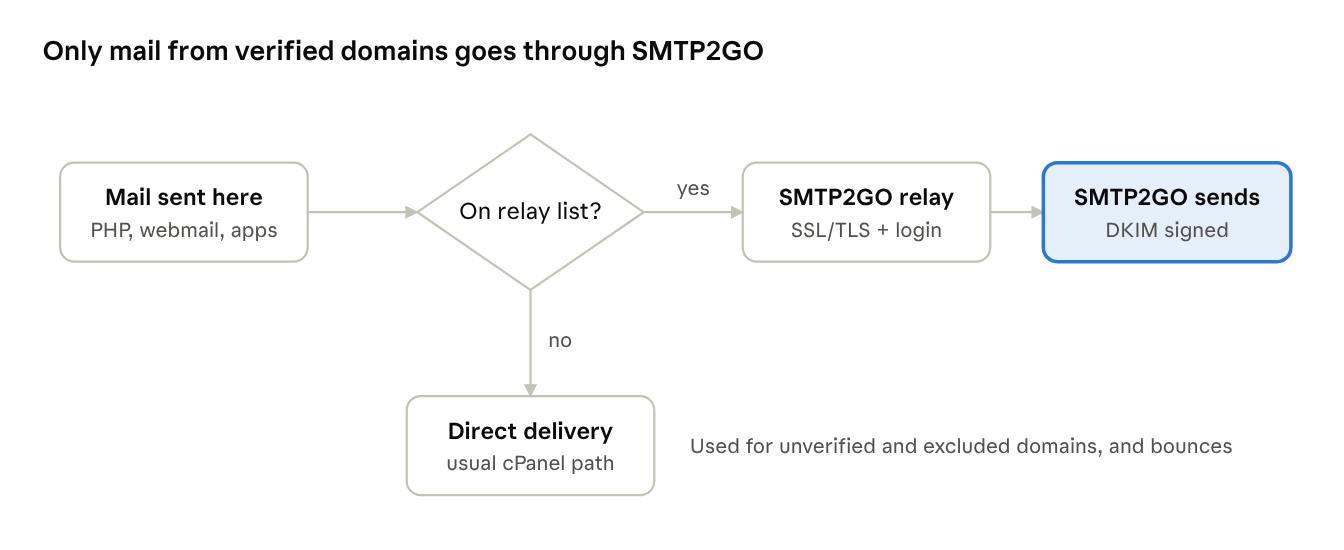
The plugin works in two parts: it prepares each domain in SMTP2GO, then tells Exim to send mail for those domains through SMTP2GO.
Functions
The plugin has eight pages plus a detail page for each domain. Every page carries the Group44 logo and copyright, and the header always shows whether the API is connected and whether the relay is on.
Screenshots
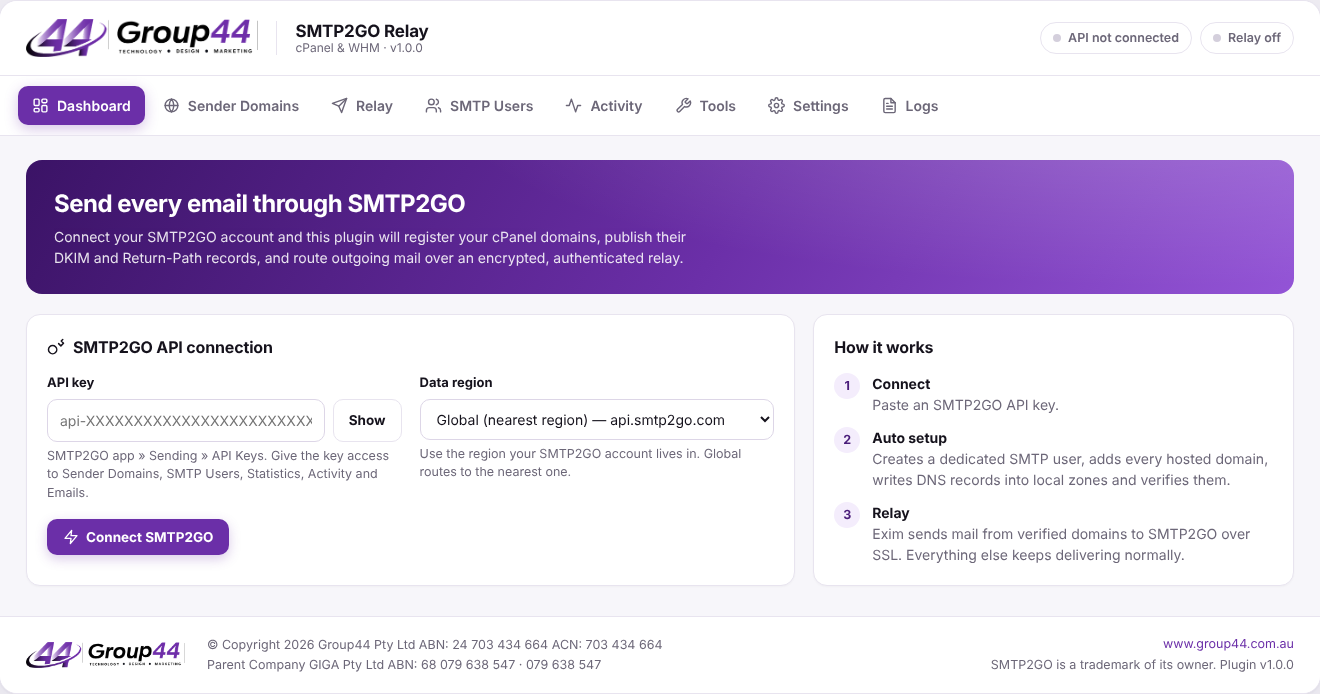
The API key form, a region picker and a three-step explainer.
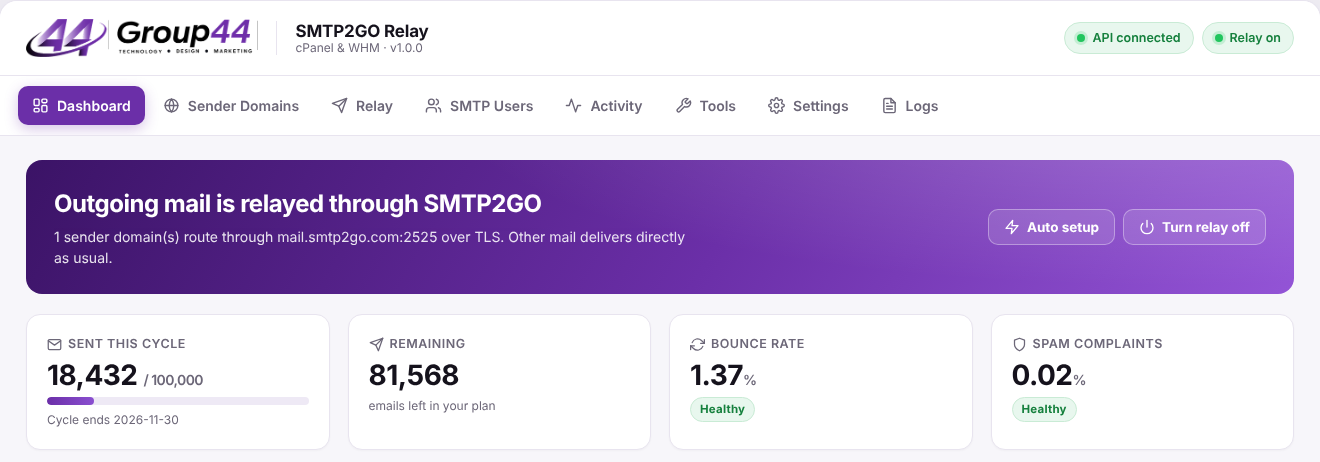
Status banner and usage tiles.
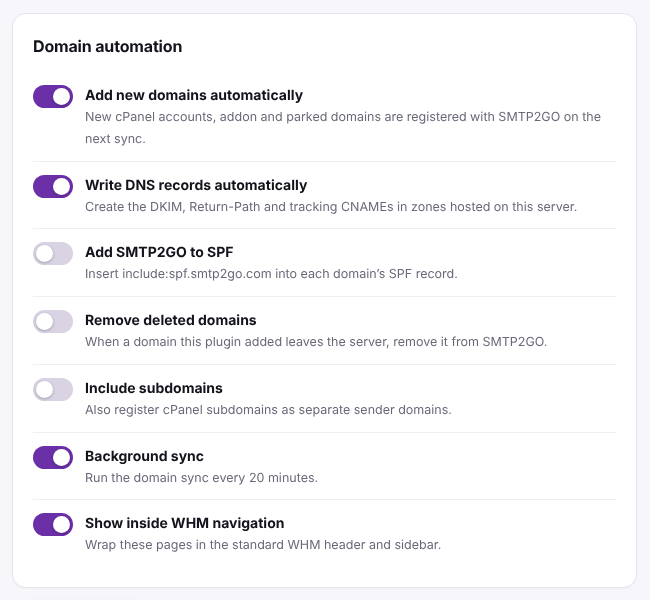
Add new domains automatically, write DNS records automatically, add SMTP2GO to SPF, remove deleted domains, include subdomains, background sync, and show inside WHM’s own navigation.
Automation
Once connected, the plugin keeps itself up to date with no manual work: new domains are picked up within 20 minutes, or straight away through cPanel hooks. Auto setup runs these steps in order and stops at the first one that fails, showing a tick or cross for each:
1
Checks the API key with SMTP2GO.
2
Creates a dedicated SMTP user for this server (named whm-<hostname>-<random>, strong generated password), unless one is already set.
3
Turns on automatic domain adding and DNS writing, and sets the relay to verified domains only.
4
Runs a full sync (below).
5
Tests the connection to the SMTP2GO server and port. If the port is blocked, it stops and asks you to pick another port.
6
Turns the relay on.
It is safe to run again; existing settings and credentials are kept.
Domain Sync
Only one sync runs at a time; a second one waits its turn rather than doubling up.
Cron job /etc/
cPanel hook queues a sync about 20 seconds later
cPanel hook queues a sync
cPanel hook queues a sync
cPanel hook queues a sync
Runs immediately
Hooks run the sync in the background, so account and domain creation is never slowed down.
Security
The plugin is built so a mistake can’t stop the server’s mail or leak credentials.
Installation
Installing takes one command as root; running the same command again upgrades in place and keeps all settings.
1
Install: run the commands shown below as root
2
Then open WHM » Plugins » SMTP2GO Relay, paste the API key, choose the region and click Auto setup.
					cd /root
unzip smtp2go-whm-1.0.0.zip
cd smtp2go-whm
./install.sh
The installer checks it is running as root on a cPanel server with PHP 7.4 or newer, copies the files, registers the plugin in WHM, adds the cron job and cPanel hooks, and creates the Exim lookup files. On an upgrade it also refreshes the relay settings.
Maintenance
					# relay off, plugin removed, settings kept
./uninstall.sh

# also deletes settings, logs and backups
./uninstall.sh --purge
From SSH, without WHM:
/usr/local/cpanel/3rdparty/bin/php-cli /usr/local/cpanel/whostmgr/docroot/cgi/smtp2go/bin/sync.php --disable
Files
					# Plugin code: index.cgi, lib/, bin/, assets/
/usr/local/cpanel/whostmgr/docroot/cgi/smtp2go/

# Settings, API key and SMTP login (root only)
/var/cpanel/smtp2go/config.json

# Cached domain status and DNS results
/var/cpanel/smtp2go/state.json

# Plugin log
/var/cpanel/smtp2go/smtp2go.log

# Last 20 copies of exim.conf.local
/var/cpanel/smtp2go/backups/

# Gets the three marked SMTP2GO blocks
/etc/exim.conf.local

# SMTP login read by Exim (root and mail group only)
/etc/exim_smtp2go_auth

# Sender domains relayed through SMTP2GO
/etc/exim_smtp2go_domains

# Sender domains never relayed
/etc/exim_smtp2go_exclude

# 20-minute background sync
/etc/cron.d/smtp2go_whm
Limits
$10.00 per month. Questions about the plugin? Contact our team. SMTP2GO is a trademark of its respective owner. This plugin is an independent integration.